Decoy Vault: What to Do When Someone Makes You Open Your Phone
A decoy vault opens an empty-looking vault with a second code. When it helps, how to set it up in KiWi Vault, its limits, and when you must never use it.
By the Nascentra team · 5 min read
Sometimes the problem isn’t a stranger finding your phone. It’s someone standing right in front of you saying “open it, show me”. A nosy relative. A partner who checks your phone. A friend who won’t let it go. A decoy vault is built for that moment: you enter a second code, and the vault opens looking empty, while your real vault stays hidden behind your real code.
We added decoy mode to KiWi Vault, and it’s part of the free app. But it’s a feature that needs a clear line around it, so we’ll start there before we get to the how-to.
When a decoy is fine to use, and when it isn’t
A decoy is for personal privacy and personal safety. It’s for situations where someone with no right to your private life is pressuring you to hand it over.
It is not for:
- Hiding things from police, courts, border officials or anyone else with lawful authority to inspect your phone.
- Concealing evidence, or anything illegal.
- Misleading anyone in a legal process.
Depending on where you are, misleading officials or hiding evidence can be a crime in itself, and the consequences can be far worse than whatever was in the vault. If you’re dealing with an official request, get proper legal advice. We’re saying this plainly because we mean it.
There’s also a safety point that matters more than any app. If the person demanding your phone is controlling, threatening or hurting you, a decoy might buy you some calm in the moment, but it isn’t a safety plan. Domestic abuse services and helplines exist in many countries, and talking to one costs nothing. If you’re in immediate danger, contact your local emergency number.
How a decoy vault works in KiWi
In KiWi Vault, decoy mode works like this:
- You set up a separate decoy PIN, password or pattern, different from your real one.
- Enter your real code, and your real vault opens as usual.
- Enter the decoy code, and KiWi opens a vault that looks empty.
- Your real vault isn’t shown anywhere in the decoy session.
- The decoy state is kept only in the app’s memory while it’s running, rather than saved as a setting, so there’s less left behind to give it away.
To the person looking over your shoulder, it looks like you opened your vault app and there’s nothing much in it.
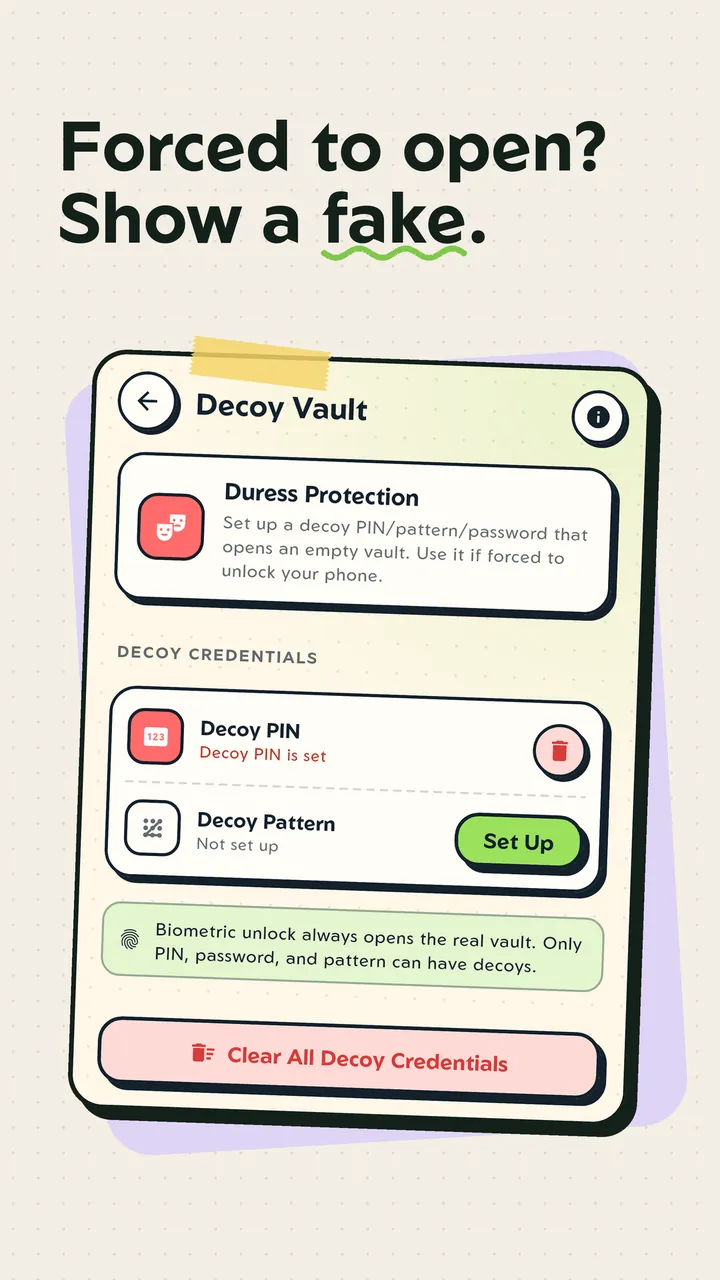
Setting up your decoy, step by step
The setup takes a few minutes. The practice is what makes it work.
- Set up your real lock and recovery first. KiWi has no account and no cloud backup, so your security questions and recovery code are your only way back in if you forget your real code.
- Choose a decoy code in KiWi’s settings. Make it clearly different from your real one, so you never mix them up under stress.
- Make it believable. A decoy that’s easy for you to remember but not obviously “fake” is ideal. Avoid something like 0000.
- Practise both codes. Open the real vault, close it, open the decoy, close it. Do it until you don’t have to think.
- Check the decoy view yourself. Look at it the way someone else would, and make sure nothing from your real vault shows up.
- Keep your real code private. A decoy only helps if nobody has seen you type the real one.
The honest limits of a decoy
We’d rather you know where this stops working than find out at a bad moment.
An empty vault can look odd. Someone who sees a vault app with nothing in it might wonder why you have it. Have a simple answer in mind, like “I set it up and never really used it” if that is honestly how you see it. You know the person better than we do.
People can know about decoys. Decoy modes are a known feature of vault apps. Someone determined, or someone who has read about them, may not believe the empty view.
It doesn’t hide that the app exists. The app still appears in your app list and Play install history on many phones. If you’d rather the app didn’t draw attention at all, our post on how a calculator vault app disguise works covers KiWi’s free Calculator and Clock locks. Premium also adds 8 secret icons so the vault doesn’t look like a vault.
It doesn’t protect a compromised phone. If someone has installed monitoring software on your phone, or has long unsupervised access to it unlocked, a decoy won’t fix that.
Your safety comes before your files. If refusing or stalling would put you at risk, do what keeps you safe. Files can be lost. You can’t.
Pairing a decoy with other protection
A decoy works best alongside a few other things:
- A strong real code. If the real code is easy to guess, someone may just try it.
- A disguise, as mentioned above, so fewer people go looking in the first place.
- Intruder photos (Premium). If you suspect someone tries your vault while you’re away, KiWi’s intruder selfie feature (Premium) photographs wrong attempts on your own phone. Please use it lawfully and tell the people you live with that it’s on.
- Keeping files offline. Cloud lockers can be opened from any logged-in device, which a decoy on your phone doesn’t cover. Our post on the offline photo vault explains why that trade-off matters.
And remember the flip side of offline storage: KiWi keeps your files only on your phone, in private app storage protected by Android’s sandbox and device encryption. If you forget your real code and your recovery options, or lose the phone, those files are gone. We can’t recover them, because we never had a copy.
A quick checklist before you rely on it
Before the day you might actually need it:
- Real code set, recovery code written down somewhere off the phone.
- Decoy code set, clearly different, and practised several times.
- Decoy view checked: nothing from the real vault visible.
- A calm, simple answer ready if someone asks why the vault is empty.
- You’ve thought about whether the person pressuring you is a safety risk, and know who you’d contact if so.
Where KiWi Vault fits
We built KiWi Vault because private photos, notes and files deserve a place on your phone that’s yours alone, without an account or a cloud copy. The decoy is part of that: a quiet way to keep some room for yourself when someone else won’t respect it. It’s free, and you can get the app from Google Play.
If you want to see the rest of what’s free and what’s Premium first, our vault app’s page lays it out. Use the decoy for what it’s for: your privacy and your safety, never to deceive anyone with a lawful right to ask.